



AI browsers promise a fundamental shift, but that can swing either way
AI browsers promise to redefine how people search, read and act online, offering convenience, albeit with new questions about privacy, power and the open web.



Artificial intelligence has tacitly entered our browsing windows, seamlessly integrating with search features, as if it had always been there. These new AI browsers don’t just answer questions; they compile research, can fill forms and even book reservations.
Take Google, which is integrating Gemini with its Chrome browser. Search results topped with AI-powered summaries for quick overviews have become the go-to way of browsing for many. The AI model also helps users recall previously browsed pages and offers a voice-based assistant with Gemini Live.
Or Aravind Srinivas-led Perplexity’s AI browser Comet, which can book meetings, compare prices across multiple sites while shopping, book reservations, and fill out forms.
These new AI browsers have triggered a shift in the way we browse daily. The change feels small at first, and then rather large, because it shifts control from surfing many tabs to refining a single conversation.
Microsoft’s latest October update to its Copilot Mode repositions the Edge browser as an AI browser, letting AI handle more grunt work by combining data gathering from user inputs and actions in the same conversation. With the ChatGPT Atlas browser, coincidentally released just a couple of days before the CoPilot update, OpenAI wants to “rethink what it means to use the web” with features like a sidebar chatbot and deep research.
The promise is obvious. Students can condense dozens of articles into a coherent summary. Travellers can plan an itinerary from a single chat and save time on bookings. Professionals can generate briefings and compare vendors seamlessly.
Anushree Verma, Senior Director Analyst at Gartner in the Emerging Technologies and Trends group, says the shift marks a fundamental change from browsers like Chrome or Safari, where navigation has been manual and user-driven.
“It’s going to be a more automated, guided, and agent-led experience,” Verma tells AI Story.
AI-powered browsing
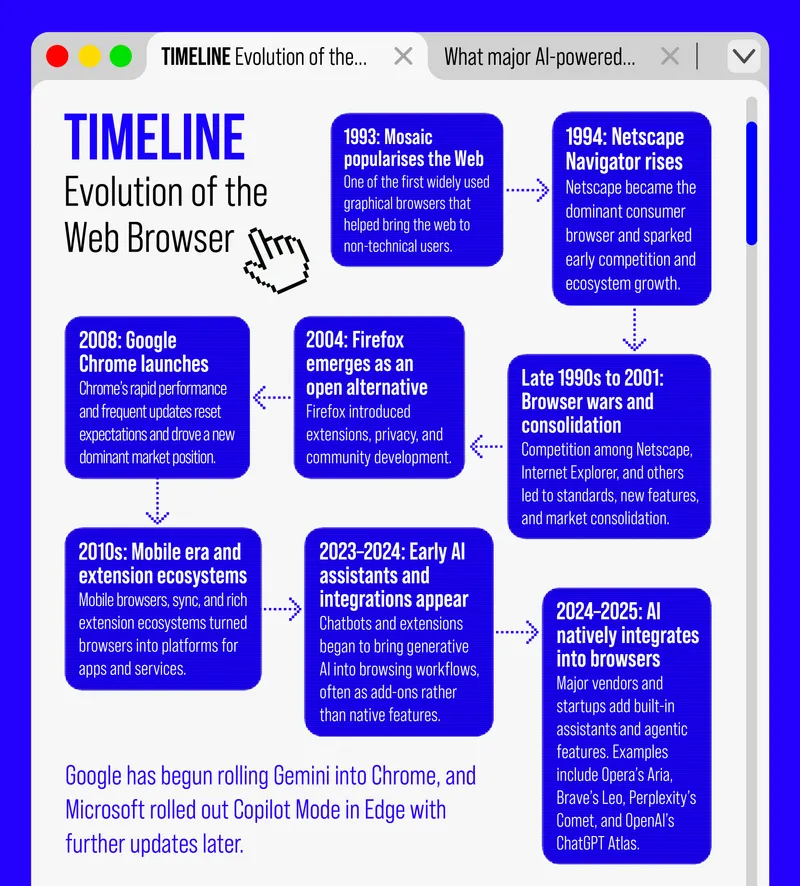
A conventional browser simply loads and displays web pages, which itself is a journey spanning 30 years. The web browser began as a niche academic tool and later became the focus of fierce competition and rapid innovation, from early graphical browsers to the first browser war between Netscape Navigator and Internet Explorer, and then to the rise of Chrome and Safari.
Now, AI browsers are upping the game by adding a reasoning layer that can answer questions, summarise content and perform multi-step actions such as comparing prices or booking services. Some systems run smaller models locally to keep data private, while others use more powerful cloud-based models that send snippets of information to remote servers. Emerging technologies such as WebLLM and WebGPU enable running large language models (LLMs) directly within the browser, eliminating the need for cloud-based APIs.
Verma notes that while cloud-based language models trained on vast datasets often deliver more specialised answers, edge-based models (which run locally) integrated into browsers trade depth for speed, giving consumers a more seamless, intuitive experience. This is exemplified by Gemini’s integration into Chrome, upgrading the address bar with an AI Mode for complex and context-aware queries.
“It’s not just AI-driven browsing, it’s agent-driven browsing. Earlier browsers used AI for optimisation, but AI agents now deliver specific answers rather than just a list of results. They automate the decision-making layer that users used to handle manually, providing direct, contextual responses based on user interactions,” she explains.
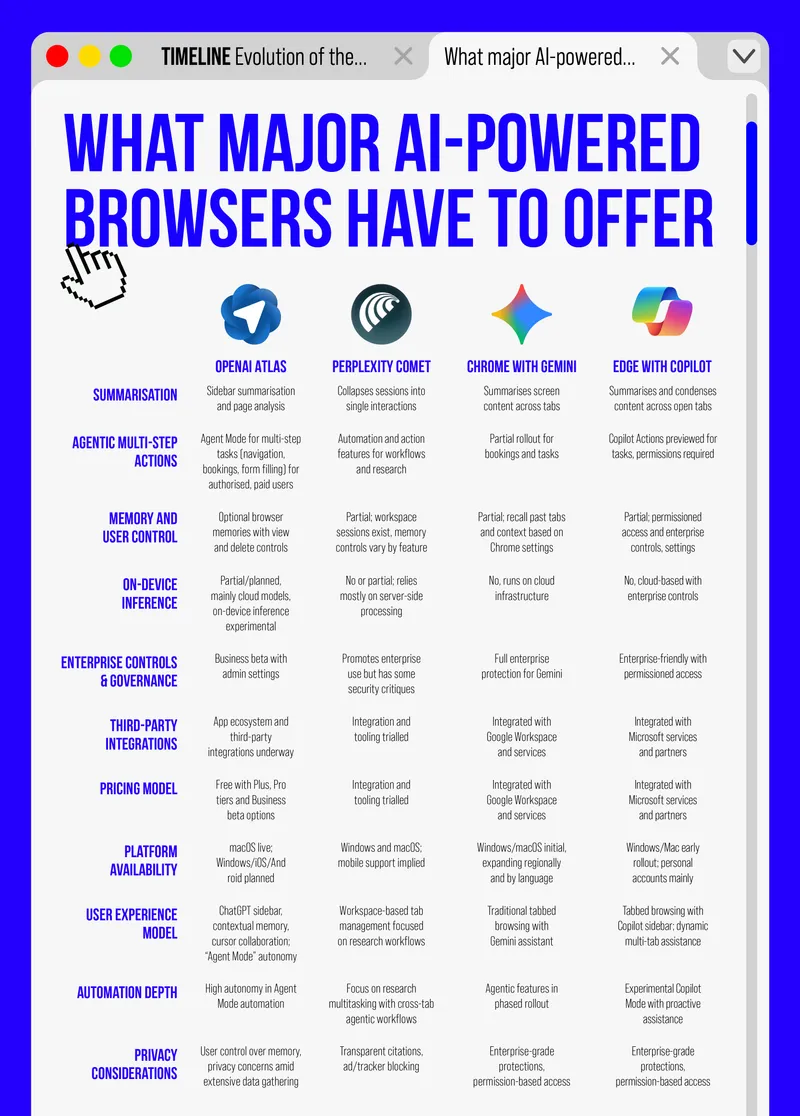
These AI capabilities turn browsing into a task-oriented workflow. For example, OpenAI’s ChatGPT Atlas offers an Agent Mode and optional browser memories that users can view and delete, giving people direct control over what the AI assistant stores. Perplexity’s Comet also provides a workspace model intended for longer-running tasks and ongoing research sessions.
Meanwhile, Microsoft’s Copilot Mode in Edge offers enterprise-oriented controls for permissions and governance in order to retain attention and capture richer interaction data.
“They (Google and Microsoft) are already adapting… Both are trying to maintain user trust and protect their dominance in the browser market through improved interfaces and AI integration,” remarks Verma.
Source: YourStory research | Design: Nihar Apte

Build own browser
AI companies like OpenAI and Perplexity are not just adding new features to existing browsers; they are trying to own the interface through which people access the web.
Verma says the motivation is straightforward. “With AI browsers, there’s huge potential profitability because whoever becomes the ‘front face’ for education, enterprise, or general use will capture massive user data and engagement.”
She believes the strategy rests on two linked goals: gaining data access and controlling ecosystems. User interaction generates behavioural data that improves model training, while controlling the platform allows vendors to integrate third-party tools and create monetisation opportunities similar to advertising networks.
OpenAI’s integrations show this in action. By adding external tools such as Canva and presentation makers into ChatGPT, the company is turning its assistant into a one-stop workspace that both serves users and earns revenue from partner collaborations. A steady stream of data also helps refine underlying models.
However, monetisation is still evolving, and the current focus is on building large user bases. “Over time, revenue will likely come from discoverability, similar to how Google and Microsoft earned through advertisements,” Verma says. Partnerships with third-party services and platform access will add to the revenue stream.
Risk of new capability
The same features that make AI browsers helpful also create fresh attack surfaces.
Brave’s security research team discovered that certain AI browsers can be manipulated through hidden instructions embedded in webpages. Attackers can use nearly invisible text that humans cannot see, but AI systems extract and execute it as commands. This could allow malicious websites to hijack AI assistants and access sensitive user accounts, including banking sites, email providers, and cloud storage, where users remain logged in.
A Kahana study and subsequent security reports recorded conditions where automated agents could expose credentials or behave insecurely on complex web workflows.
Ashis Sahoo, Associate Director- Risk Management & Audit, at WNS Global Services, frames the privacy risk as a major threat. “It’s not just the browsers; AI as a service, where people provide large amounts of information, is going to cause serious issues, especially from a data privacy perspective. That said, most organisations do have very stringent DLP (data loss prevention) policies in place.”
He adds that companies are already deploying mitigations such as browser isolation and hardened policies, but warns that these are only partial solutions.
He further explains, “These tools still have the capability to extract critical data from organisations. The challenge is that much of this AI processing happens on the backend with third-party providers, which poses a significant threat because that data could be misused or exploited in ways that harm competitiveness.”
Source: YourStory research | Design: Nihar Apte
Privacy and compliance
Many AI browser features need access to pages, form fields, and sometimes, account data to be useful. With cloud processing, snippets of web content and user inputs may be transmitted to remote servers. Some browsers offer memory features that persist context across sessions, allowing users to resume their work exactly where they left off.
“Privacy tends to be an afterthought. Every vendor adds its own layers of data handling, but users often underestimate how much personal data is already used for personalisation and targeted advertising; the same applies to AI browsers,” Verma notes.
“Governments are working on regulations, like India’s Digital Personal Data Protection (DPDP) Act, to balance innovation with privacy protection. However, with rapid innovation, open-source models, and integration across multiple platforms, it’s hard to maintain complete data protection.”
Regulators are taking note as browsers begin to make decisions on behalf of users. Certifications or transparency labels that describe data collection and retention practices are possible future outcomes.
Zero-click economy
AI summarisation can sharply reduce clicks to original articles. Research from Similarweb shows that traffic to the world’s 500 most visited publishers fell 27% year-on-year since February 2024, whilst AI chatbots have increased by 5.5 million visits monthly. DMG Media reported that some search results saw click-through rates drop by as much as 89% in extreme cases.
That decline has immediate economic consequences. Many publishers rely on search referrals for 20%–40% of external traffic, so fewer clicks mean fewer ad impressions, subscription opportunities and audience engagements. Several publisher groups have lodged complaints with competition authorities, arguing that summarisation without opt-outs or compensation skews the market against content creators.
Verma sums up the structural shift: “Traditionally, you are presented with a list of options, and advertisements or sponsorships influence visibility. That business model gets disrupted with AI browsing, where discoverability works differently.”
“Previously, being one of the top search results on Google was essential for visibility. But with AI agents, discoverability now depends on how web data is scraped and processed. It’s no longer just about being sponsored or promoted, it’s about being discoverable by AI tools through keywords and structured data,” she adds.
Vendors will now need to ensure their products are represented during the training of these AI models, not just indexed at the application layer, changing both the business model and discoverability dynamics. Publishers and platforms are testing responses, from licensing talks and revenue sharing to technical fixes that make content more likely to be cited.
Bottom line
AI browsers promise to reduce friction and speed up many everyday tasks, while also concentrating power and data in new ways. These tools deliver real productivity gains and new workflows, but they also centralise interaction data and create fresh vulnerabilities that need active management.
“AI agents are reshaping how we search, code, and interact online. Just as smartphones became integral to daily life, AI agents are now becoming embedded in our routines, often without us realising how pervasive they have become,” remarks Verma.
Edited by Kanishk Singh